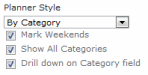


Configuration - Planner Style
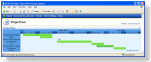
| Gantt
The chart will be displayed as a Gantt chart - with the Category label on the left, the Title inside the bars and the time. The timelines and milestones are organised so that each has its own row and the later the start date, the further down the chart they appear. Gantt Charts are commonly used in Project Management. |
 |
|---|---|
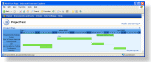
| Gantt, sort same as View
A standard Gantt chart is organised by the tasks Start and End dates - with the tasks that are to be completed first shown at the top of the chart. If you want to use a custom sort order, perhaps alphabetical, then you can set Planner to use the same sort order that you have setup in an underling View. You must select this view using the Planner Source option. |
 |
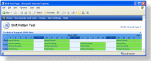
| By Category The timelines and milestones are grouped in to Categories. They are organised so as many can fit onto one line as possible. They are useful for things like scheduling, shift planning and resource booking. In the example chart the category could be a shift or job function - the chart shows that for the 3rd week in the series no-one has been assigned to the first shift/job function. When using the By Category style you have the option to :-
|
|
| Classic No Category column is displayed and the timelines and milestones are organised so as many can fit onto one line as possible - very similar in appearance to the standard office "Wall Planner". Useful for organising things like employee vacations. If you want to be able to see employee vacations by team/department then you may find the By Category chart more useful. |
 |