

Common Scenarios - Announcements
SharePoints built in Alert Me feature has several limitations. It can't (out of the box) be setup to
- Alert all users of a change in a list
- Email all addresses in a particular list
- Customise the email and include fields from your list
In this example we are going to use SharePoint Reminder to send out an email alert to everyone in our Contacts list when a new announcement is made. This could be especially useful if you want to email users who may not have a SharePoint account setup.
 |
Create a
new web part page to hold the Reminder Web Parts for
this workflow.
|
|
|
|
Add a Reminder web part to the page and configure it as follows
:-
|
|
|
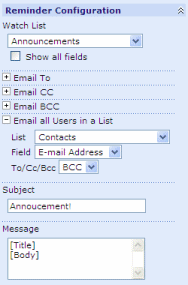
Select the Announcements list (or any other suitable list) Click "Email all users in a List" and then select your Contact list. Select the field that contains the email addresses and in this case we will choose to Bcc each recipient. Tips
Also enter a suitable subject and message. Remember you can include fields from the list by using the syntax [FieldName]. |
|
|
|
In this case we don't want to restrict when the email is
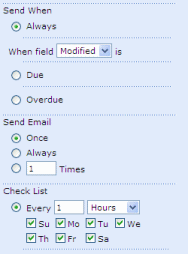
sent out based on any dates, so select Send When - Always. We only want one email to be sent out for each Announcements so select Send Email - Once. Enter a suitable value for Check List - if an immediate email delivery is not important then select several hours to minimise the work the server has to perform. |
 |
|