


Troubleshooting - 401 Unauthorized Errors
-
HTTP status 401: Unauthorized
You receive an error similar to this in the event log.
Access Denied - HTTP Status 401, Unauthorized accessing


URL:http://<your_url> SK:XXXXXXXX-XXXX-XXXX-XXXX-XXXXXXXX


using Integrated authentication, user account NT AUTHORITY\SYSTEM.


Please consult the manual for troubleshooting tips.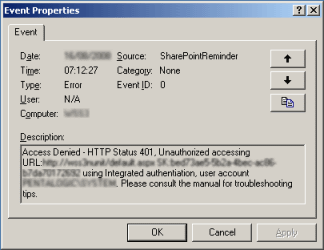
The SharePoint Reminder Service is receiving a 401 error when it tries to access the SharePoint Web Services.
The most common errors are listed here :-
-
You have not setup the local loopback check to allow NT Authentication
If you start up Internet explorer whilst logged on to your SharePoint server and browse to your SharePoint site you will be prompted for authentication 3 times before receiving a "HTTP 401.1 - Unauthorized: Logon Failed" error.
If you perform the same test from IE running on a remote server it works fine.
This is because the "local loopback check" only permits NT Authentication to the localhost address for defined hostnames.
Follow the steps listed in this article - http://support.microsoft.com/default.aspx?scid=kb;en-us;896861
-
You are using WSSv3 or MOSS 2007 and have not setup the appropriate permission policy
If you are running WSS v3 (SharePoint 2007) then you must give the user account the "Reminder Service" is running under full permission for any Web Applications (virtual servers) that you intend to place Reminder Web Parts on. Please see this page for further information.
-
The Web Site has a different authentication setting to the Reminder Service
For example you have set the Reminder Service to use Basic Authentication and the web site is using Integrated Authentication or vice-versa.
Please see the Configuration Tool instructions for further information.
-
You are using Basic Authentication and the password set in the Configuration Tool is incorrect
Double check the Username, Domain and Password you have set in the Configuration Tool. Confirm them by logging on to the URL given in the error message and use the same credentials.
-
You are using Basic Authentication and the credentials set in the Configuration Tool do not have the appropriate permission
The account specified must be either a member of the SharePoint Administrators group (set using SharePoint central administration) or the Local Administrators group to have SharePoint Administration rights.
Note - changes to the SharePoint Administrators group using the Central Administration page is not picked up until you issue an IISRESET
-
You are using HTTPS but have not setup the SecureBindings metabase property
If you notice that an IP address or incorrect URL is listed in the error message then you have not set SecureBindings in the IIS metabase. This is similar to the DNS Alias problem as without the SecureBindings property being set SharePoint has no way of determining the DNS name that an IP address represents. You will also notice that SharePoint Administration pages Virtual Server List shows the sites by their IP address or incorrect URL.
To correct this follow the steps listed here to set the SecureBindings metabase property
cscript.exe C:\Inetpub\AdminScripts\adsutil.vbs set /w3svc/<site identifier>/SecureBindings ":443:<host header>"
Where <hostheader> is the host header for the site and the <site identifier> is IIS's internal Site ID.