


Send When Configuration
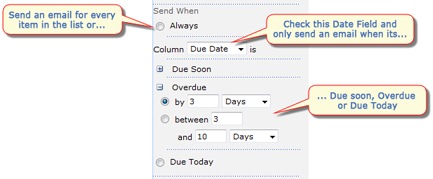
This section allows you to configure when an email is sent.
|
|---|
Always
This option configures the Reminder emails to be sent for every record in the List and View.
For example this could be useful if you had a list of Helpdesk support tickets. You could configure a View to show high priority, open tickets. You could then configure the reminder web part to send an email for every ticket in the list (always) every hour - ensuring that high priority support tickets do not get overlooked.
See Common Scenarios for more detail on this example and other examples of common uses for SharePoint Reminder.
When field X is ...
This option configures SharePoint Reminder to check a field in your list and only send an email if it is Due within or Overdue by a certain time.
You can choose from the following options
- Due within a certain time, e.g. Due within the next 5 days.
- Due between a certain time, e.g. Due between 10 and 5 days.
- Overdue by a certain time, e.g. Overdue by 5 days or more.
- Overdue between a certain time, e.g. Overdue between 5 and 15 days.
- Due Today
See Common Scenarios for examples of common uses for SharePoint Reminder.
Note - If you choose When field X option then if the value of this field is changed it will reset the count of how many emails have been sent.
Note - If you have chosen to Expand Recurrences then the "Always" and "Overdue by X or more" options will not be available and you will be limited to the Start Time and End Time columns.