


Manual Web Part Installation
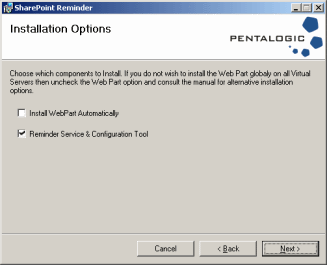
The Installation program will by default install the Web Part into the Global Assembly Cache (GAC) to all Virtual Servers
If you wish to install the Web Part manually you can uncheck the Web Part option on the Installation Options page and install the Web Part manually using STSADM or using the tool of your choice.
Note - you MUST install the web part manually when using SharePoint Server Subscription Edition, the option screen will not be shown
SharePoint 2010, 2013, 2016, 2019 or SharePoint Server Subscription Edition
This example shows how to deploy the web part to all sites using the SharePoint Management Shell:-
Installation
    CD "C:\Program Files\Pentalogic\SharePoint Reminder\"


			    Add-SPSolution "$(gl)\Pentalogic.SharePointReminder.WebPart.wsp"


			    Install-SPSolution –identity "Pentalogic.SharePointReminder.WebPart.wsp" –AllWebApplications –GACDeployment -Force
Removal
    Uninstall-SPSolution "Pentalogic.SharePointReminder.WebPart.wsp" –AllWebApplications


			   <You may have to wait a few minutes for the SharePoint Timer service to complete the retraction from all WFE's in a farm before the next step will run successfully>


    Remove-SPSolution -Identity "Pentalogic.SharePointReminder.WebPart.wsp"
WSSv3 or Microsoft Office SharePoint Server 2007
This example shows how to deploy the web part to all sites on a local server using STSADM :-
Installation
SET PATH=%PATH%;"c:\Program Files\Common Files\Microsoft Shared\web server extensions\12\BIN\"
CD "C:\Program Files\Pentalogic\SharePoint Reminder\"
    STSADM.EXE -o AddSolution -filename

			Pentalogic.SharePointReminder.WebPart.wsp


    STSADM.EXE -o DeploySolution -name

			Pentalogic.SharePointReminder.WebPart.wsp -allcontenturls -immediate

			-force -allowGacDeployment


    STSADM.EXE -o execadmsvcjobs
Removal
SET PATH=%PATH%;"c:\Program Files\Common Files\Microsoft Shared\web server extensions\12\BIN\"
    STSADM.EXE -o RetractSolution -name

Pentalogic.SharePointReminder.WebPart.wsp -allcontenturls -immediate
STSADM.EXE -o execadmsvcjobs
    STSADM.EXE -o DeleteSolution -name Pentalogic.SharePointReminder.WebPart.wsp

-override
WSSv2 or SharePoint Portal Server 2003
This example shows how to deploy the web part to all sites on a local server using STSADM :-
Installation
SET PATH=%PATH%;"c:\Program Files\Common Files\Microsoft Shared\web server extensions\60\BIN\"
CD "C:\Program Files\Pentalogic\SharePoint Reminder\"
STSADM.EXE -o addwppack -filename Pentalogic.SharePointReminder.WebPart.cab -globalinstall -force
    STSADM.EXE -o

		deletewppack -name Pentalogic.SharePointReminder.WebPart.cab
Installing to individual sites
SharePoint 2007 or newer
Use the following deploy solution command
STSADM.EXE -o DeploySolution -name Pentalogic.SharePointReminder.WebPart.wsp -url http://yoursite -immediate -force -allowGacDeployment
WSSv3 or SharePoint Portal Server 2003
If you wish to install the web part to a specific virtual server, you should use the -url option in addition to -globalinstall. The STSADM documentation is a little misleading, -globalinstall actually installs the web part into the Global Assembly Cache (GAC) which is necessary for it to function correctly. If you include the -url parameter it does not install the web part dwp file into every virtual servers web part gallery.
		STSADM -o addwppack -filename Pentalogic.SharePointReminder.WebPart.cab

		-url http://<yourvirtualserve> -globalinstall -force
Code Access Security (CAS) Permissions.
SharePoint Reminder requires a high level of Security permissions to run correctly, including reading the Registry, Serialization and Remoting - hence the requirement to install into the GAC. It is recommended that you do not attempt to install the Web Part to the bin directory and set Code Access Security permissions by editing the web.config files manually.