

SharePoint Reminder - Troubleshooting
This page lists some common troubleshooting steps - of course if these don't solve the problem please don't hesitate to contact us at Technical Support - please provide as much detail as you can and be sure to run the Diagnostics utility.
-
The Local Loopback check has not been configured
This is responsible for perhaps 80% of all problems when initially installing Reminder.
Please check this out, its essential or correct operation of Reminder and SharePoint
-
I have setup SharePoint Reminder but am not receiving emails
Firstly please check the event log for any errors listed in the link above.
Then check that your SharePoint Server is configured correctly with the Diagnostics utility.
If this doesn't solve the problem then please contact us at us at Technical Support providing as much detail as you can.
If you can receive emails successfully :-
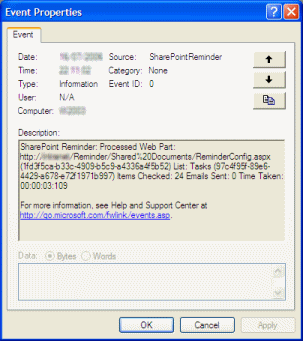
- Please check the Event Log for Information Events from SharePointReminder similar to the following
"SharePoint Reminder: Processed Web Part: http://yourserver/yourpage.aspx (1fd3f5ca-b33c-4909-b5c9-a4336a4f5b52) List: Tasks (97c4f95f-89e6-4429-a678-e72f1971b997) Items Checked: 24 Emails Sent: 0 Time Taken: 00:00:03:109" This shows that the SharePoint Reminder Service processed the Reminder Web Part you have setup on page "http://yourserver/yourpage.aspx" but didn't find any items in the list that matched the criteria you have setup for sending emails - so please review the configuration of the web part and satisfy yourself that it is setup as you require.