


Send Email Configuration
This section allows you to configure how many Reminder Emails should be sent out for each record in your list.
|
For example you may wish to send 3 email reminders for an overdue task. You also have to option to reset this count if a field changes, for example :-
Note - If you change the value of whatever Date Field you have chosen for the Send When field then the count is always reset, you don't have to also set the same field as the Reset Field. For example :-
Tip - You can set this to Resend Email 0 Times to temporarily disable a Reminder Web Part. |
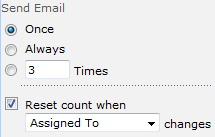 You can choose how many emails are sent for each record in your list |
|---|